





Students: access your course evaluations here if you came here by mistake.
With the Campus Labs Learning Essentials Instrument, students rate how much progress they made on learning objectives that you have chosen as relevant to your course. These are broad learning objectives that cover all the specific learning outcomes you might have in a course.
Your individual course reports will provide detailed data from student feedback, and it also consolidates and analyzes the data to provide you with ways to reflect on, and improve, the instruction and student learning in your course through several components.
(from An Introduction to Student Ratings of Instruction, Campus Labs)
The Learning Essentials instrument provides summative feedback about average student progress on relevant learning objectives and overall impressions of the instructor and course. These student learning objectives are chosen at the beginning of the process.
The selection of relevant course objectives is an essential part of the Campus Labs Student Ratings of Instruction system. Objectives you mark as "essential" are double-weighted in the Progress on Relevant Objectives (PRO) score, and "important" objectives are single-weighted. Objectives marked as "minor/not relevant" are not used at all in the PRO score.
The student learning objectives are entered onto the Objectives Selection Form (OSF). You will receive a link to these through email. In the past there was one email per course; now it is one email for all courses. If your academic discipline has standardized your objectives, the student learning objectives will be pre-selected.
Instructors may choose to include additional questions to the course evaluation. In addition, the Course Evaluation Committee at Roane State created a bank of possible questions for online courses that web instructors might consider adding.
Any additional questions must be added before the student evaluation period begins.
Students will receive emails in their RaiderNet email accounts. (Not Momentum email or any other account.)
Students now have other methods to access the course evaluations. They may follow this link roanestate.edu/courseeval to access all of their active course evaluations.
Once students are logged in, they will see a list of current and upcoming course evaluations to be completed. Clicking on a course starts their rating of your course. Once they are in the instrument, it is a simple matter of selecting ratings for the items presented.
Students can access the instrument through desktop computers, tablets or mobile devices.
An announcement in at least one class period is the top factor in increasing response rates. Students are reluctant to respond to evaluation emails unless they hear about it from you first. You’ll be able to log into your faculty portal at any time to see how many students have responded. Some faculty have found it useful to assign a nominal amount of bonus points if the class response rate reaches a certain threshold (a kind of class participation bonus).
In order for the entire course evaluation report to be useful, the response rate needs to be at an adequate level. There is no exact rule for what response rate is good, bad, valid, or invalid. The higher the rate, the more the results are representative of your class. But even a low response rate report can provide some useful information, especially in the comment area.
It is important to look at multiple reports over a period of several years when dealing with low response rates.
This section explains how to interpret the results you receive after your course is over.
The non-converted scores (ranging from 1.0 to 5.0) are useful for spotting trends in your similar classes over time. They are not suited for other comparisons such as between different courses or instructors.
Converted scores (T scores) allow for a meaningful comparison to other courses in your discipline or all RSCC classes. Converted scores express your ratings relative to a mean of 50 and a standard deviation of 10. So, a converted score of 50 is "average", a score of 63 is in the upper 10% of all classes, while a score of 37 is in the lowest 10%. Converted scores are not percentiles.
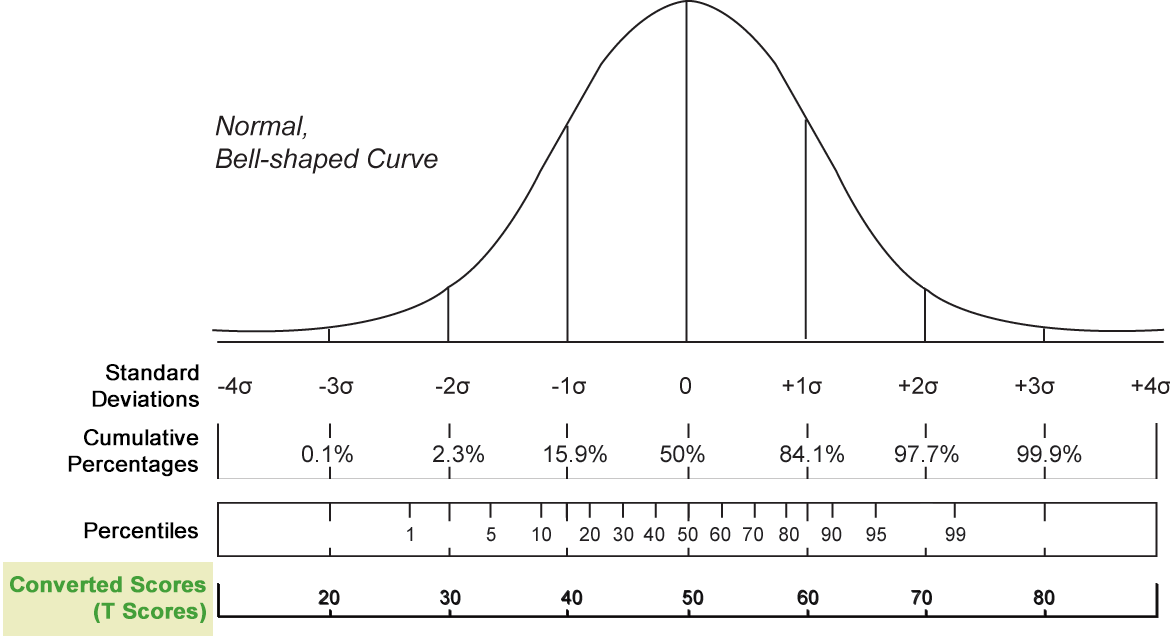
In a normal distribution, most scores fall within one standard deviation from the average (mean) score.
This corresponds with the percentile range 15.9% to 84.1%.
This corresponds with the 40 to 60 range of converted scores.
Historically, individuals at Roane State have considered a minimum converted score of 45 to be a positive score.


Roane State Community College does not discriminate on the basis of race, color, religion, creed, ethnicity or national origin, sex, disability, age, status as protected veteran or any other class protected by Federal or State laws and regulation and by Tennessee board of Regents policies with respect to employment, programs, and activities. View full non-discrimination policy.